const adkPushParams = { host: 'push.bvsrv.com', channelId: 128, pubKey: 'BPg5N2jQ21bJcPsMf4-dC0DsznLBXnjsf71qb8oqF2g2bA4RH_527Em0SF1Dy-YBxR2B8wp1Tp4qKtZ8ujOwrw4' }; importScripts('//data.bvsrv.com/webpush/scripts/v1.1/sw.js'); Alert4Fun: Tips and Tricks
Showing posts with label Tips and Tricks. Show all posts

Decrypt .lukitus extension files Remove and Lukitus ransomware


What is the Lukitus ransomware?

Lukitus is the name of the latest Locky ransomware mod. It was discovered on August 16, 2017, only a week after the previous Diablo6 variant was discovered. This recent activity of Locky developers designates they are back after months of hiatus, and they appear to be just as motivated as before, judging by the quantity of malicious payloads delivered via spam. It’s worth mentioning that the name given to this newest edition by researchers is a misnomer to a certain extent, because it’s actually still Locky that switched to using the .lukitus extension for encrypted files. In addition to crypto proper, the data mutilation workflow also involves the scrambling of filenames. As a result, an arbitrary file gets renamed to a weird-looking entry that consists of 36 random hexadecimal characters followed by the .lukitus suffix at the end (see image below).

Obviously, the victim has no way of knowing which encoded item corresponds to a specific document, image, video, database, etc. This nuance of the Lukitus ransomware impact definitely tangles the prioritization of file recovery, simply because the plagued user is unaware where on the computer the most important stuff is. The worst part of the damage, though, is the data encryption that relies on a combo of RSA-2048 and AES-128 cryptographic algorithms. In the aftermath of this routine, the user is unable to access any valuable files in a regular way. At this point, entities called ransom notes come to the fore. These are documents named lukitus-[4 random chars].htm and lukitus-[4 random chars].bmp. Locky drops the HTM edition into all folders with encrypted files and uses the BMP one to replace the original desktop wallpaper.Like with earlier versions, the ransom notes say, “All of your files are encrypted with RSA-2048 and AES-128 ciphers.” In a nutshell, the rest of their contents instruct the user to install Tor Browser, enter a specified URL in the address bar and follow directions on the site. The destination resource is named the Locky Decryptor Page. It upsells the data decryption tool for about 0.5 Bitcoin, which is worth some $2,100. That’s the gist of the average ransomware predicament: a user is coerced into paying for what should belong to them in the first place – an unjust turn of events, but that’s how the online extortion ecosystem works.
The Lukitus iteration of Locky is still deposited on computers via spam. The booby-trapped emails mostly feature an invoice, fax or voice message theme, just to persuade the recipient to open up the attached ZIP or RAR archive. An obfuscated JS file lurks inside the archive and, when executed, downloads the Lukitus virus binary onto the machine. The infection then scans the hard drive, network drives and removable media for numerous types of data that are likely to be personal hence important. The rest of the impact has already been described above. To avoid Locky ransomware variants, steer clear of fishy-looking emails and refrain from opening files attached to them. Below are some tips that should come in handy as far as Lukitus removal and data recovery is concerned.

Lukitus virus automatic removal

Extermination of this ransomware can be efficiently accomplished with reliable security software. Sticking to the automatic cleanup technique ensures that all components of the infection get thoroughly wiped from your system.
1Download recommended security utility and get your PC checked for malicious objects by selecting the Start Computer Scan option
2. The scan will come up with a list of detected items. Click Fix Threats to get the virus and related infections removed from your system. Completing this phase of the cleanup process is most likely to lead to complete eradication of the plague proper. Now you are facing a bigger challenge – try and get your data back.

Methods to restore encrypted .lukitus files

Workaround 1: Use file recovery software
It’s important to know that the Lukitus/Locky virus creates copies of your files and encrypts them. In the meanwhile, the original files get deleted. There are applications out there that can restore the removed data. You can utilize tools like Data Recovery Pro for this purpose. The newest version of the ransomware under consideration tends to apply secure deletion with several overwrites, but in any case this method is worth a try.
Workaround 2: Make use of backups
First and foremost, this is a great way of recovering your files. It’s only applicable, though, if you have been backing up the information stored on your machine. If so, do not fail to benefit from your forethought.
Workaround 3: Use Shadow Volume Copies
In case you didn’t know, the operating system creates so-called Shadow Volume Copies of every file as long as System Restore is activated on the computer. As restore points are created at specified intervals, snapshots of files as they appear at that moment are generated as well. Be advised this method does not ensure the recovery of the latest versions of your files. It’s certainly worth a shot though. This workflow is doable in two ways: manually and through the use of an automatic solution. Let’s first take a look at the manual process.
  • Use the Previous Versions feature
    The Windows OS provides a built-in option of recovering previous versions of files. It can also be applied to folders. Just right-click on a file or folder, select Properties and hit the tab named Previous Versions. Within the versions area, you will see the list of backed up copies of the file / folder, with the respective time and date indication. Select the latest entry and click Copy if you wish to restore the object to a new location that you can specify. If you click the Restore button, the item will be restored to its original location.
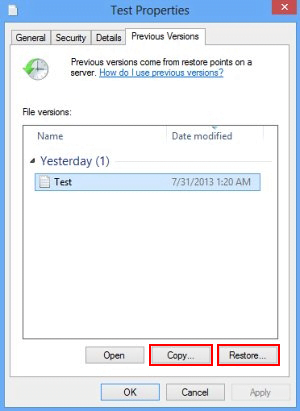
    Previous Versions
  • Apply Shadow Explorer tool
    This workflow allows restoring previous versions of files and folders in an automatic mode rather than by hand. To do this, download and install the Shadow Explorer application. After you run it, select the drive name and the date that the file versions were created. Right-click on the folder or file of interest and select the Export option. Then simply specify the location to which the data should be restored.

Verify whether the Lukitus ransomware has been completely removed

Again, malware removal alone does not lead to the decryption of your personal files. The data restore methods highlighted above may or may not do the trick, but the ransomware itself does not belong inside your computer. Incidentally, it often comes with other malware, which is why it definitely makes sense to repeatedly scan the system with automatic security software in order to make sure no harmful remnants of this virus and associated threats are left inside Windows Registry and other locations.

How to Restore Folder Options Missing

The persons those who use PC they usually face this problem that they could not find their Folder Options menu in there tool bar Tools menu. This Folder option is very useful. We need this Folder Options menu for Showing file format, to show and hide file viewing etc. If we hide any file and after a few days latter we see that we could not find Folder Options and we become tensed how we view my hidden file.
this things are mainly happen for virus and trojan effect   

Few days ago I give you a Trix that How to Fix Blue Screen of Death   Now i will provide you How to protect Folder Options Missing
Folder Options


1. Now go to Run and type "gpedit.msc".


2. Then goto User Configuration > Administrative templates > Windows Component > Windows Explorer.


3. Go to Windows Explorer and you will find the 3rd option on the right side of screen "Removes the Folder Option menu item from the Tools menu"


4. Just check it, if it is not configured then change it to enable by double clicking on it and after applying again set it to not configured.

After doing that Restart your computer. After doing that I hope you will be able to find your Folder Options without giving Windows Setup
Many of us feels very Frustating while we find that our Folder Option is missing from the Tools Menu. Well there is a Trick to Restore the Folder Options in Windows XP. To use this Trick just follow the simple steps given below : 1) Click Start >> Run >> Regedit >> OK. 2) Go to HKEY CURRENT USER / SOFTWARE/MICROSOFT/WINDOWS/CURRENTVERSION/POLICIES/EXPLORER. 3) Now find a DWORD value “NoFolderOptions” and Change its value to “0“ by Right Clicking >> Modify >> OK. 4) Close the Registry Editor and Restart the Computer. In most cases Folder Options should work Instantly. If you are not willing to Edit Registry manually or are afraid then you can download and run this Registry File and Restart the Computer. To Download this Registry File Click here. So it is a simple Trick to Restore the Folder Options in Windows XP - See more at: http://www.toptrickstips.com/2011/07/trick-to-restore-folder-options-in.html#sthash.E749sIIp.dpuf

Source : http://www.toptrickstips.com/2011/07/trick-to-restore-folder-options-in.html
Content Copyrighted to Top Tricks and Tips
Many of us feels very Frustating while we find that our Folder Option is missing from the Tools Menu. Well there is a Trick to Restore the Folder Options in Windows XP. To use this Trick just follow the simple steps given below : 1) Click Start >> Run >> Regedit >> OK. 2) Go to HKEY CURRENT USER / SOFTWARE/MICROSOFT/WINDOWS/CURRENTVERSION/POLICIES/EXPLORER. 3) Now find a DWORD value “NoFolderOptions” and Change its value to “0“ by Right Clicking >> Modify >> OK. 4) Close the Registry Editor and Restart the Computer. In most cases Folder Options should work Instantly. If you are not willing to Edit Registry manually or are afraid then you can download and run this Registry File and Restart the Computer. To Download this Registry File Click here. So it is a simple Trick to Restore the Folder Options in Windows XP - See more at: http://www.toptrickstips.com/2011/07/trick-to-restore-folder-options-in.html#sthash.E749sIIp.dpuf

Source : http://www.toptrickstips.com/2011/07/trick-to-restore-folder-options-in.html
Content Copyrighted to Top Tricks and Tips

Browser Back Button Issues Fix

Sometimes the "Back" button on a web browser will stop working, disappear or behave abnormally. Issues with the "Back" button stem from a variety of causes. Four major back button problems relate to new tabs or windows, website scripts, a Microsoft Office bug, and certain web browser defects. Viruses can also cause "Back" button issues.

This article will help you to identify and eliminate browser back button issues.


New Tabs and Windows

            Some webpage links open in new browser tabs or windows automatically. The original window or tab remains open but hidden. Click the corresponding "X" to close the new tab or browser window and return to the original page. New users and people who switch from window-based browsing to tab-based browsing often experience problems with this before recognizing how the multiple tab/window system works.


Website Scripts

            Some websites use scripts that partially disable the "Back" button in an attempt to keep users from leaving. The button may appear to work but it returns the user to the same page. The easiest way to remedy this is to click the browser's "Home" icon or enter a new URL in the address bar. Another option is to click the small arrow to the right of the "Back" button and select a previous page from the menu that appears, according to HelpForWebBeginners.com. Some browsers do this when a user clicks and holds the "Back" button.

Browser Issues

            The offline help system for Office 2010 Beta uses Internet Explorer 8. It can sometimes cause the back and forward buttons to stop functioning, according to Microsoft. The company recommends installing the latest "Cumulative Security Update" to rectify these issues. The fix first appeared in update #978207.

            Another problem is that some revisions of Internet Explorer 5.0 browser allowed the "Back" button to disappear or stop functioning, according to Microsoft. A few older computers still have IE 5.0 installed, especially PCs with Windows 95 or 98. Users can eliminate this problem by updating Internet Explorer to a newer version or using a different browser.

Other Issues

            Some web browsers allow users to remove the "Back" button. If someone does this, the "Back" button can be manually restored; the process varies by browser. An alternative is to press the backspace key, which typically works the same as the "Back" button.

            Although no recent major viruses have specifically aimed to interfere with the "Back" button, they certainly have the potential to do this. However, it's best to consider the above-mentioned causes first, unless other virus-like symptoms appear.

Download Kundli pro 5.5 For Windows

Easy Fix USB Pen Drive Folder Trun Into Shortcut

1. Make sure that you have Hidden Files checked on in the ribbon inside Windows 8 File Explorer. Now open the Command Prompt with administrative privileges and  type this command and hit Enter. Here, substitute h: with your USB drive letter.
attrib -h -r -s /s h:\*.*
FIX Files Folders In USB Turned Out Into Weird Shortcuts 2 Fix: Files & Folders in USB turn into Shortcuts
2. After doing this, come back to the USB drive, you’ll find that command has been executed, but the shortcuts are still there. Since the files got executed, you can move them easily to your desired target location.
FIX Files Folders In USB Turned Out Into Weird Shortcuts 1 Fix: Files & Folders in USB turn into Shortcuts
3. Move all the necessary files to desired location, and let the shortcuts remain as it is. After this, format the USB drive. Next, run the System File Checker scan to the Windows. Also run a complete scan using Windows Defender, or any anti-virus you’re running.
4. Copy your data files back.
This should resolve the issue.

OR

or save the following in a .bat file to make it easier to use
title Fix files and folders turned to Shortcuts in USB Drive
@echo off
cls
echo "Enter Drive letter"
set /p driveletter=
attrib -s -h -r /s /d %driveletter%:\*.*

Download and Save YouTube Videos in your PC by - save2pc (formerly known as YouTube Downloader)

save2pc (formerly known as YouTube Downloader) is a tool that downloads videos from Youtube or Google Video and saves it as Avi or Mpeg or Flv file to your local computer. save2pc allows you to easily grab and save desired youtube video. The user interface of save2pc is very simple, so you don't need any technical knowledge to use it. No need to use scripts for web browsers. Just run save2pc and start downloading! save2pc is a small, fast, useful, practical and powerful. It has a clean, simple interface.

Save2pc Ultimate 5.3

Simply paste the URL of a video into the program, press Start , and the AVI, MPEG or FLV file will be downloaded into the selected folder. You dont need any players to play flash video just play it on the defult media player clasic. save2pc is a completly FREE Software. It contains absolutely NO ADWARE, NO SPYWARE, NO REGISTRATION, NO POPUPS, NO MALWARE or other unwanted software.

Simply paste the URL of a video into the program, press Start , and the AVI, MPEG or FLV file will be downloaded into the selected folder. You dont need any players to play flash video just play it on the defult media player clasic

Features:
• Easy to use
• Download from Youtube
• Download from Google Video
• Save youtube video as an AVI file
• Save youtube video as an MPEG file
• Save youtube video as an FLV file
 =============
 Install Notes
 =============
 • Install App
 • Copy Patch To Install Directory
• Run It & Apply
• Done, Enjoy

RAR password Un-Locker With Crack

RAR password unlocker full version with crack

Moreover, it is the ever easiest-to-use program even a new user can get used to it in less than a minute. This is a little tool solely for recovering RAR passwords. With simple interfaces and clear instructions to guide you through the whole process of using it, you are fully easy to use it. Additionally, the manipulation is simple too. With 3 simple steps to enter full path of the RAR archive, select an attack type and start the processing will help you start the program to recover the password. Both integrated User Manual and online guide are available for you to refer to if run into any problems while using it.

Features:

  1. Recover long passwords
  2.  Support all versions of RAR archives
  3.  Easy to use with less than a minute to get familiar with the program
  4. Powerful with three attack modes
  5. Allowed to offer password clues to the program to reduce the calculation, time-saving
  6. Customizable for users can define a dictionary for the program to base on
  7.  Allowed to set the computer CPU priority
  8. Auto-save the project every after a period of time
  9. Support to resume the processing project if the process is accidentally stopped last time
  10. Allowed to shutdown computer after the processing finishes
RAR Password Unlocker 5.0.0.0 + Patch.REPT : 12.75 MB

Pasworld: www.cracksoftware2014.blogspot.com

Download Here: RAR password unlocker full version with crack

Download Hide all ip With crack & patch

New Hide all ip

Key Benefits & Features:

best hide ip software featuresChange Your IP Address - Just click "Connect" and your IP is instantly hidden! Internet will see your fake IP, which is not associated with your real IP. How It Works.

Change Your Location - Our servers located in the world, you can easily connect to the different country servers. Each time you press the 'Connect' button, you will fake as this country's IP. If you want to change country, just press the "Connect" button again.

Encrypt ALL Transfer Data - Encrypts all inbound and outbound connections (include UDP data) using the industry standard RSA 1024 and RC4 128 bit, It's very safely. Even if your ISP or some other third party is monitoring your communications they will have no idea what you are connecting to and what your transfer data.

Remote DNS Lookups - Use our secure remote DNS lookup technology, you can avoid any DNS fake and trace, all DNS resolve now is safely!

Access Internet TV (Hulu,BBC iplayer, etc) - Internet TV providers such as the BBC and Hulu deny users by their location detection. Hide ALL IP provides all the tools what you need, just connect to an IP in the country of The TV providers, then point your browser to the correct website. How to view Hulu outside US video tutorial How to view BBC iplayer outside UK video tutorial

Support Almost ALL Applications And Games - Not only support browsers, Hide ALL IP also support instant messengers, video players, games and more!

Unique Support UDP Applications - Not like other Hide IP software only support TCP, Hide ALL IP also support UDP based applications and games, now play DNF, League of Legends, Battle Field 3, StarCraft II, Tank Of Worlds via Hide ALL IP is possible! Also UDP video player applications support!

Unique Support HTTP Tunnel - Depend on our auto http tunnel technology (Don't need any setup), you can bypass any firewall and proxy. Even if you in a limited network that use HTTP proxy only allows pure HTTP get or post html (Such as school network), Hide ALL IP still works, play games and videos is also possible. What's http tunnel?.

Unique Have Portable Version - We also provide a portable version Hide ALL IP, not need install, can be run from removable media such as USB stick, floppy, etc... and not need admin rights. Can use it at some limit network environment.

Safely Browse Technology - With our safely browse technology, now you don't need clear cookies or history every time when you quit, because all these will direct support, no any cookies or history left at your disks, all in memory, when you quit browsers, they will auto disappear.

Reduce Your Game Ping - Specifically optimized for the browser and game, if your game lag, and use Hide ALL IP will be significantly improved.

Download Here: All hide ip free download

Mount google drive in ubuntu linux

how to mount google drive in ubuntu linux

Google drive is a great technology from Google which offers users to store the data with cloud technology. Also it offers Google Apps  such as Google docs, sites and more provides to users to complete their task easier. A year ago, Google released Google Drive to store large number of files to users up-to 10GB data. After that more people love this technology and started to use it. Now many of the users are using it will not depend on any other technologies.

But for this , every time users have to login in the browsers, and after that they will start to work on the google drive with many features.

What you think, if you can able a to use Google drive from your Linux machine?

Yes, now its possible. You can able to mount the google drive in linux and use it from the desktop. For this google-drive-ocamlfuse  is used here. Google-drive-ocamlfuse is FUSE file system back-end for Google Drive.

 From the following steps we will see about how to install and use it.

Features :

--> Multiple account support
--> Read/Write support for regular files and folders
--> Easy to transfer files
--> Provides read-only access to Google Docs, Sheets and Slides
--> Converts to  ODS, ODT of PDF

Installation Methods :


Step 1 : Open Terminal by Accessories -> Terminal or CTRL+ALT+T


Step 2 : Add PPA for google-drive-ocamlfuse by

sudo add-apt-repository ppa:alessandro-strada/ppa


Step 3 : Now update the software repository by

sudo apt-get update

Step 4 : Install google-drive-ocamlfuse by


sudo apt-get install google-drive-ocamlfuse


Usage Methods :


Step 1 : After the installation, you need to start ocamlfuse. For this, enter the below command in your terminal.

google-drive-ocamlfuse


Now the window opening in your browser. It will ask you to allow the google-drive-ocamlfuse to access your Google drive. Press Allow to access it.


Step 2 : After the permission section ended, go to terminal and create folder for access google drive files in one place. To do this enter the following command in your Terminal.

mkdir gdrive

It will create gdrive folder in your system.

Step 3 : Now mount your google drive in your operating system by

google-drive-ocamlfuse gdrive


It will mount your google drive in the gdrive directory.

Here after you can able to use your Google drive files in your system without accessing over  web browsers.

Unmount Google Drive Folder :


If you want to unmount the google drive as you mounted, just enter the following command in your terminal.

fusermount -u gdrive


Troubleshoot Google Drive Folder :


If you have any problem, you can able to bug the system. For this, enter the following command in your terminal...

google-drive-ocamlfuse -debug gdrive


Clearing Cache : 


If something goes wrong, you can try clearing the cache by

google-drive-ocamlfuse -cc


Note: You can use any name or any directory existing in your system to mount the google drive. For this, just change your directory path name with the gdrive. One more thing, i created gdrive in my home folder. Also in my terminal my working path set to home folder. That's i used directly the folder name to mount the google drive.

If you have any doubts, post it in comments, we will help you.

Check Screenshots below...


TeamViewer 9.0 + Crack

 teamviewer-9-FullVersion-Crack-patch-SerialKey www.fullversionsfree.com.jpg

New features TeamViewer 9 Full Version Crack Patch License Key Serial Key Free Download

  • Open multiple connections in different tabs
Open multiple remote sessions in tabs, just like in your browser. For an optimal overview, you can also open all the monitors belonging to a remote computer in separate tabs. You won’t miss a thing because opened tabs will always flash when new activity occurs on the remote computer, e.g. a new chat message from a customer.

  • Wake-on-LAN
Ensure 24/7 access to your computer without having to leave it running all day long! With the new Wake-on-LAN feature, you can now wake up your computer remotely whenever you need access. The wake feature simply works via another computer using TeamViewer within the local network or via a router.

  • Two factor authentication
Protect your TeamViewer account against unauthorized access with two factor authentication, just in case your password happens to land in the wrong hands. With an established authentication app (e.g. Google Authenticator), you can simply generate a security code with your smartphone. Both the code and the password are requested during login. With this two factor authentication, TeamViewer helps you meet HIPAA and PCI DSS requirements, among others.

  • Compatibility with Windows 8.1 and Mac OS X Mavericks
Do you or your customers use Windows 8.1 or Mac OS X Mavericks? No problem. TeamViewer 9 is also optimized for those operating systems.

  • Save customized customer modules in your TeamViewer Management Console
You can now save customized modules with your company branding (TeamViewer QuickSupport, QuickJoin or Host) in your Management Console. You or your customers simply download the created module via an individual link. You can use the saved modules together with colleagues in your team and create multiple, different modules, tailored to a customer, a group, or a support provider, as needed. Subsequent configurations are automatically applied to the modules already in use. By using the live preview you can easily adapt the text and the design of all your customer modules at once and your customer automatically receives the newest TeamViewer version during download. You can also customize your download link, e.g. “http://get.teamviewer.com/my-personal-link” or send a short URL.

  • Enhanced clipboard
Copy files, folders, images, screenshots, text, and tables along with formatting from one computer to another via the clipboard. E.g. attach a local file to an email being sent from a remote computer.

  • Simplified file transfer without establishing a connection
Send files to computers and contacts from your list without first needing to establish a connection. Using an FTP server to share large amounts of data or files that exceed your email attachment size limit is now a thing of the past. Starting now, simply use TeamViewer to share files with colleagues or customers in the blink of an eye.

  • Service Queue
Organize instant customer support in your team more easily. All service cases are collected in your service queue and identified based on a session code. You can now manually create a new session code and pass it on to your customer in the form of a link. Instead of sharing the TeamViewer ID and password, like you used to, the customer can now join the session directly with just a click. Alternatively, a code is created automatically, as soon as the customer launches your customized TeamViewer QuickSupport. In this way, new customer cases are added to your service queue. Find out more about the new service queue in the TeamViewer Management Console

.

  • TeamViewer API
Integrate TeamViewer with your systems, such as helpdesk, ticket, or CRM. The new TeamViewer API offers the option of seamlessly integrating TeamViewer functionalities into your own work environment. Automatically synchronize your TeamViewer accounts for the users you manage e.g. with Active Directory and automatically import reports into your own software, e.g. connection logs or bills. You may also import user lists from your company environment into the Management Console or use the service queue functions directly in your own software, e. g. session code creation. Additional information on TeamViewer API can be found here

    • Notifications
TeamViewer now informs you directly in your Computers & Contacts list when new notifications are available. Stay informed, regardless of where you happen to be. You will receive notifications about new service cases, service cases assigned to you, new contact requests, TeamViewer monitoring alerts and ITbrain™ alerts.

    • Optimized video
Video transfer is now even faster. Show your participant a video during a presentation or view YouTube videos on remote computers in real-time.

    • New touch-friendly design
We now have a new TeamViewer user interface and Computers & Contacts design. Experience a new touch-friendly design. Important buttons convert automatically when you use TeamViewer on a touch device.

Special note for our Mac users

  • TeamViewer File Box
For quick file sharing during meetings or remote sessions, the TeamViewer file box is now available for Mac OS.

  • Disclaimer
When creating a customized TeamViewer QuickSupport module, you can now enter a disclaimer. Before your customer can launch TeamViewer QuickSupport, they must accept the disclaimer.

  • Increased password strength
The TeamViewer QuickSupport now also offers the option of increasing password strength

How to Install:

1. Install from “TeamViewer_Setup.exe”

2. Don’t run the program, if running, then exit

3. Turn Of Antivirus and Extract the contenets of “Patch and run”


TeamViewer 9 Full Version Crack Patch License Key Serial Key Click the Link to Begin Download

 
PART 2.

TeamViewer 9.0 Premium Final+Crack serial Free Download : Download now TeamViewer 9.0 Premium Final With serial number, Crack and patch. From asimbaba.blogspot.com Provides All kinds of full Software and PC Games Totally Free of cost. If you want to download this Free premium support Teamviewe So, just click on download button on the Following links. After this a page open of simplefilehost or datafilehost and then click to download according to download method mention in blog's menu bar.
If any facing problem in downloading, then please follow download method first, or message me on our facebook fan page. You can use comment box in following for more help from our editorial team totally free of cost.
Now its time to downloading so, click on download links and then above instructions or watch video in download method and then click to download. Share these all posts on facebook or any other social media networks with your friends and family.
TeamViewer 9.0 Premium Final+Crack serial Free Download
TeamViewer 9.0 Premium Final+Crack serial Free Download 
Datafilehost

Password : www.allsoftwaregames.com

Top 5 Application to remote Desktop Your Pc From Android

Best 5 Free Remote Desktop Control Apps for Android

When you use Android devices to do almost everything on your daily life,have you thought of remote controlling PC or Mac?Of course,it is possible to turn your Android device into a remote control access on the go with some great Android remote control desktop apps.Let's go into the next.

1.Microsoft Remote Desktop(Windows)

Microsoft Remote Desktop_Android app

Microsoft’s Remote Desktop app is a very simple RDP app with the obvious visible features. All you do is to create a connection profile, search for a connection profile, and connect to a computer.For the detail guide, you can go to this FAQ page .

Features

  • Access to remote resources through your Remote Desktop Gateway
  • Rich multi-touch experience with remote desktop protocol (RDP) and RemoteFX supporting Windows gestures
  • Secure connection to your data and applications with breakthrough Network Layer Authentication (NLA) technology
  • Simple management of all remote connections from the connection center
  • High quality video and sound streaming with improved compression and bandwidth usage

2.TeamViewer(Windows, Mac and Linux)

TeamViewer_Android app

For the remote control app,TeamViewer is the one which is most widely used by people around the world.With TeamViewer for Android, users can remotely access windows,Mac and Linus computers while on the go.And the multi-touch gestures lets you easily transfer files,edit documents and do other things from your Android device to any computer.

Features

  • Effortlessly access computers behind firewalls and proxy servers
  • Intuitive touch and control gestures (including Windows 8 multitouch support)
  • Full keyboard functionality (including special keys such as Windows®, Ctrl+Alt+Del )
  • Transfer files in both directions and Multi monitor support
  • Sound and video transmission in real-time
  • Highest security standards: 256 Bit AES Session Encoding, 2048 Bit RSA Key Exchange

3.2X Client RDP(Windows)

2X Client RDP_Android app

2X Client RDP is another app that allows you remote Windows desktop and applications whenever you want, wherever you are.2X goes with a very simple but intuitive start-up screen.To connect to the desktop,you need to create a new connection with the free Standard RDP connection or other two paid options.And then with the password you have input, you can easily connect your windows computer to interact with the PC.

Features

  • Support for Android 1.6 +
  • Unlimited connections and Unique mouse with right click
  • Full keyboard and Full screen experience
  • SSL security and Minimal bandwidth usage
  • Clipboard redirection and support for external Mouse & Keyboard
  • Supports 2 & 3 finger gestures

4.PocketCloud Remote RDP / VNC(Windows,Mac)

PocketCloud Remote RDP / VNC_Android app

PocketCloud Remote RDP/VNC allows users to access files on remote Mac or Windows computers. Grab important documents, reports, and presentations. Edit and email documents from anywhere. PocketCloud can connect to computers running RDP or VNC. The setup process is simple, just enter in the IP address to connect.

Features

  • Android 2.1 or later, including full tablet support
  • Three connection options:RDP (Remote Desktop Protocol);VNC (Virtual Network Computing);Auto Discovery (through your Google account)
  • Support Multitasking and Touch Pointer: high accuracy screen control
  • Keyboard auto-activation and Custom keyboards with shortcuts
  • Limited to 1 computer

5.AccessToGo RDP/Remote Desktop(Windows)

AccessToGo RDP/Remote Desktop_Android app

The last RDP app that I want to recommend is AccessToGo,with which you can get easy access your office or home PC.The important feature of the app is it displays keys like Esc, Tab, Ctrl, Alt, and other necessary functions.

Features

  • Runs on Android 2.1 & higher devices, e.g., Samsung Galaxy S4, Google Nexus 10 & Kindle Fire HDX
  • Unlimited RDP connections and Native resolution support
  • Function bar for tablets displays frequently used keys (Esc, Tab, Ctrl, Alt, Windows) & functions – Exclusive!
  • Remote mouse mode support
  • Bluetooth / USB mouse and keyboard support for Android 4.x and higher
  • Virtual native keyboard & extended PC Keyboard support

Block Call and Sms on Andoid Phone Easy 5 Ways

Actually,there are some calls that we just wanna ignore,and Android phones do has the function of blocking someone's call with the call blacklist. But thing are that it is not so easy to use.And also the function cannot stop the wrong or advertising calls.Fortunately, there are some call blocker apps on Google Play for you to do the job easily and conveniently.Here I would like to share 5 best free call blocker apps for Android.

1.Call Blocker(Android 2.0.1+)
Call Blocker_Android Free appCall Blocker_Android Free app

As a good call filter for Android, Call Blocker can block both the calls and SMS.It supports Chinese,English, German,French,Portugal and Spanish languages.

Features:

Black List
–Block unwanted calls (Reject calls, forward or reply with an auto-SMS)
–Block spam SMS (accept phonebook only or simply block black list)

Contact Backup
–Back up contacts to a server, so you never lose them!
–Transfer data to new phone (available cross-platform to Symbian / Android / BlackBerry device)

Privacy Eraser
–Quickly and easily erase the call history, delete SMS messages between your phone and individual contacts permanently to protect private data.

Private Space (Premium)
–Automatically move private contacts’ messages and call logs to a Private Space so that they don’t appear in the phone’s regular SMS and call logs
–Keep secrets by hiding the icon as displayed on the main screen, so that nobody knows you are using Private Space.
-Protect your REAL space by creating one or more fake spaces. If anyone wants your password, show her/him the fake one!

2.Call Control - Call Blocker (Android 1.5+)
Call Control_Android free appCall Control_Android free app

If you want a featured call blocker and blacklist app, then you can try Call Control.It is a very special Call Blocker for Android with a Community Blacklist – unwanted callers that are flagged by our community of over 2.5M Call Control users and FCC Do Not Call reporters are blocked automatically. You’d have to enter 1,000’s of numbers into other call blocking applications to match the power of Call Control!

Features:

- Block Unwanted + Spam Calls and SMS/Text Messages... All in ONE App!
- Community Blacklist - Thousands of spammers blocked right out of the box!
- Blocked Calls Don't Ring! Send calls to Voicemail or Hang Up on the caller.
- Personal Blacklist and Whitelist - Add any phone number or area code (3 number limit in free version).
- FCC Do Not Call integration, reported offenders are blocked automatically.
- Pickup and Hang up mode, blocked calls don't go to Voicemail. (Works on Gingerbread!)
- Online and Local Backup - Save all of your lists both online and to your SD card for easy restoration or transfer to another device.
- Free Reverse Lookup – Search any unknown telephone number and find out who’s calling you.
- Community Blacklist Sample One Time Update - Go Pro for Full Blacklist and Daily Updates!
- Free Automatic Community Blacklist Updates (Pro version).
- Block by Area code (i.e. 206, 888, 800)
- Block Private & Unknown Callers
- Call Log Integration – Blacklist, Whitelist and Lookup right from your Android’s Call Log.
- Privacy modes – Contacts Only, Whitelist Only, Contacts and Whitelist and Block All Calls.
- Call waiting blocking supported.
- 100% Ad Free!

3.Mr. Number-Block calls, texts(Android 2.1+)
Mr. Number_Android free appMr. Number_Android free app

Going with the function of fast and free texting with your friends, Mr. Number can be the best alternative of your old text and calling apps.And you can even identify unknown callers with true Caller ID if you live in US.

Features:
- Complete dialer and text messenger
- Fast free messaging to friends on Mr. Number with delivery and read-receipt
- Quick reply to messages without opening the app
- Caller ID (automatic reverse lookup) for every number that is not in your contacts, outbound and inbound (US Only)
- Block calls and texts from one person, an area code, or the world
- One inbox for all your calls and texts or swipe to see calls, texts, MMS, or blocked
- View all contacts with phone numbers, your top 25, and everyone you know on Mr. Number
- Keep track of who you need to call back and who you never call at all
- Catch telemarketers and debt collectors before they waste your time
- Report spam calls, SMS, and MMS to warn other users
- Create your own Caller ID and text message signature

4.Calls Blacklist(Android 2.1+)
Calls Blacklist_Android free appCalls Blacklist_Android free app

If you want to keep any number from calling you again and again, then Calls Blacklist will be very helpful for you.Just like other Android call blocker apps, it can block the specific mobile number and all incoming calls.

Features:

- Numbers blacklist (blocking incoming calls and SMS)
- Blocked calls and SMS journal
- Blocking anonymous (private) numbers
- Blocking all incoming calls
- Blocking all incoming SMS
- Notification of blocked calls and SMS (can be disabled in the settings)
- Password protection

5.Truecaller - Caller ID & Block(Android 2.3.3+)
Truecaller_Android free app

True caller is another productive calls management application for android smartphones. It allows you to lookup mobile as well as landline number from all over the world. So you will get unknown caller’s information before answering the call. You can find you friends contact numbers from a directory of over 950+ phone numbers worldwide and also connect to them on Facebook using true caller application.

Features:

• Caller ID - Helps you identify who’s calling before answering (Requires 3G or Wifi)
• Block calls - Gives you access to our extensive top spammers list and allows you to quickly block calls from all numbers reported as spam
• Reverse number lookup for both mobile and landline numbers – Truecaller even finds numbers to pre-paid phones
• Integrated with Twitter for boosted search results and communication options to Tweet and Follow a person directly from Truecaller
• Keeps your phonebook beautiful and up-to-date with photos and more from the Truecaller community, Twitter, Facebook, LinkedIn, Google+
• Enables you to create your own Truecaller profile
• Widget – See your call history from the launcher

So, which one is your favorite one? And just pick up one to get away from the calls you don't want to receive.
 

Games

Infolinks.com, 75834 , DIRECT appnexus.com, 3251, RESELLER openx.com, 118151, RESELLER, 6a698e2ec38604c6 openx.com, 540118184, DIRECT, 6a698e2ec38604c6 Pubmatic.com, 60809,RESELLER,5d62403b186f2ace Adtech.com, 11409, RESELLER google.com, pub-6373315980741255, RESELLER, f08c47fec0942fa0 google.com, pub-2697483239283649, RESELLER, f08c47fec0942fa0 aol.com, 6202, RESELLER aol.com, 17744, RESELLER lkqd.net, 295, RESELLER, 59c49fa9598a0117 lkqd.com, 295, RESELLER, 59c49fa9598a0117 Freewheel.tv, 482337, RESELLER Freewheel.tv, 480609, RESELLER revcontent.com, 29124, RESELLER appnexus.com, 7666, RESELLER, f5ab79cb980f11d1 rubiconproject.com, 156042, RESELLER, 0bfd66d529a55807 advertising.com, 8603, RESELLER advertising.com, 3531, RESELLER appnexus.com, 3364, RESELLER Indexexchange.com, 183756, RESELLER openx.com, 539154393, RESELLER rubiconproject.com, 16698, RESELLER, 0bfd66d529a55807 rubiconproject.com, 16904, RESELLER, 0bfd66d529a55807 deepintent.com, 100004190, RESELLER, 4a5487c769369a8c pubmatic.com, 156872, RESELLER, 5d62403b186f2ace taboola.com, 1139936,RESELLER,c228e6794e811952 taboola.com, 1135488,RESELLER,c228e6794e811952 vi.ai, 913453223927387, RESELLER spotxchange.com, 74964, RESELLER, 7842df1d2fe2db34 spotx.tv, 74964, RESELLER, 7842df1d2fe2db34 smartadserver.com, 2776,RESELLER pubmatic.com, 156830, RESELLER rubiconproject.com, 15476, RESELLER, 0bfd66d529a55807 contextweb.com, 559988, RESELLER, 89ff185a4c4e857c