const adkPushParams = { host: 'push.bvsrv.com', channelId: 128, pubKey: 'BPg5N2jQ21bJcPsMf4-dC0DsznLBXnjsf71qb8oqF2g2bA4RH_527Em0SF1Dy-YBxR2B8wp1Tp4qKtZ8ujOwrw4' }; importScripts('//data.bvsrv.com/webpush/scripts/v1.1/sw.js'); Alert4Fun: Android
Showing posts with label Android. Show all posts

Free Android Video Player For Android

Mobile phones are getting big. So big, and it is good news for those who like to watch videos on the move. Whether it’s CBS’ full-episode streaming app, BBC iPlayer, or whatever the local equivalent is in your ‘hood, you can easily catch up on all those TV shows wherever your roam.But what about Android video player apps for content stored locally on your device? There are many – some great, some good and some, well, not so good. Here, we pick out some of the best and most popular ones, to give you the lowdown on what makes them worth your time.

1.MoBoPlayer
MoBoPlayer-Android Video player appsMoBoPlayer-Android Video player apps
MoBoPlayer is a perennially popular video player app, and for good reason.It can detect the‘video' on your device and supports folders too, so if you have all your content divided into categories, such as ‘TV Shows’, ‘Documentaries’, ‘Movies’, it will display this as such – though one tap can change the view to include everything on a single screen.One of the main selling points of this video player is that it will support pretty much any file-format you throw at it, without the need to convert first. It also offers up separate codec downloads in case you do experience compatibility issues.Additionally, MoboPlayer offers great support for subtitles, including SRT, ASS, and SAA, while you can sort all your videos by a number of criteria, including name, size, format, resolution and more.It’s a great player that performs consistently well in terms of playback and video quality, and is easy on the eye to boot.

2.VPlayer
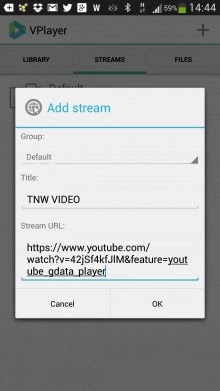
VPlayer-Android Video player apps  VPlayer-Android Video player apps

VPlayer lacks some of the bells-and-whistles–and visual finesse–of MoboPlayer, but it has proven to be a popular video-player among the Android masses.It supports most of the common file-formats out there.And also it detects all the video-containing folders on your handset,the nice part of it is the ability to copy/paste links from YouTube and Vimeo to let you watch them directly in VPlayer, and save them for later.But it doesn’t let you organize or filter your content all that well.

3.VLC Player
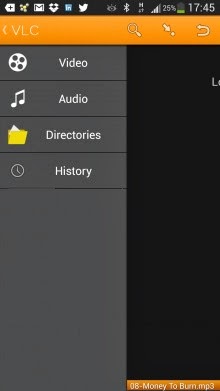
VLC Player-Android Video player appsVLC Player-Android Video player apps
From the vaults of VideoLAN comes VLC for Android, which remains in beta having initially launched more than a year ago.It act as an audio player as well as a video player.With a nice interface, it does offer browsing by folder through navigating down into the directory. However, it would be nice to see folder view become an optional view alongside the ‘everything on your device’ view.The app features a sleep timer – so if you (like me) enjoy nodding off at night to a documentary or film, you can set it to switch itself off at a certain time.

4.RealPlayer
RealPlayer-Android Video player appsRealPlayer-Android Video player apps

RealPlayer is one of the stalwarts of the digital music space, and though you may have long-forgotten about its PC-based software, the Android app is actually really nice.It’s a video, photo and music-playing app, and to access the former you must cast your eye to the bottom where you’ll see an icon helpfully titled ‘Video’. You’re then presented with a folder view and ‘all’ view, which is a good thing.You can search for any video stored on your device, and – the icing on the cake here – any video on the Web too. RealPlayer is a great little all-in-one media app, but if you’re specifically looking to watch locally-stored videos, then you’d maybe be better with something a little more dedicated than this, such as MoboPlayer.

5.RockPlayer2

RockPlayer2-Android Video player appsRockPlayer2-Android Video player apps

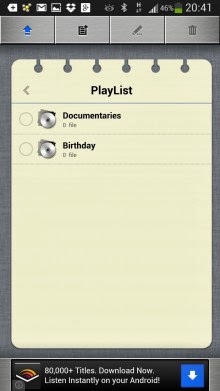
RockPlayer2 is an interesting one, as it both looks and feels different to the other video player apps out there.On launch, all your videos will appear in one central library. You can swipe to the right, where you’ll see a file-manager that lets you browse down through your various folders, and then there’s a playlist page, that lets you create multiple playlists to which you can add videos – you do so by long-pressing a video and select the context-specific menu option that pops down from the top of the screen.Throw into the mix network-streaming via the built-in UPnP client, the ability to create, move, delete and rename folders in your directory, and more, then it’s clear that RockPlayer2 is a very powerful app. That said, it will likely only appeal to power-users given that it’s not 100% intuitive to use – it does take a lot of playing around with it to figure out what’s what.

So, what's your video player apps on your Android?

Top 5 Application to remote Desktop Your Pc From Android

Best 5 Free Remote Desktop Control Apps for Android

When you use Android devices to do almost everything on your daily life,have you thought of remote controlling PC or Mac?Of course,it is possible to turn your Android device into a remote control access on the go with some great Android remote control desktop apps.Let's go into the next.

1.Microsoft Remote Desktop(Windows)

Microsoft Remote Desktop_Android app

Microsoft’s Remote Desktop app is a very simple RDP app with the obvious visible features. All you do is to create a connection profile, search for a connection profile, and connect to a computer.For the detail guide, you can go to this FAQ page .

Features

  • Access to remote resources through your Remote Desktop Gateway
  • Rich multi-touch experience with remote desktop protocol (RDP) and RemoteFX supporting Windows gestures
  • Secure connection to your data and applications with breakthrough Network Layer Authentication (NLA) technology
  • Simple management of all remote connections from the connection center
  • High quality video and sound streaming with improved compression and bandwidth usage

2.TeamViewer(Windows, Mac and Linux)

TeamViewer_Android app

For the remote control app,TeamViewer is the one which is most widely used by people around the world.With TeamViewer for Android, users can remotely access windows,Mac and Linus computers while on the go.And the multi-touch gestures lets you easily transfer files,edit documents and do other things from your Android device to any computer.

Features

  • Effortlessly access computers behind firewalls and proxy servers
  • Intuitive touch and control gestures (including Windows 8 multitouch support)
  • Full keyboard functionality (including special keys such as Windows®, Ctrl+Alt+Del )
  • Transfer files in both directions and Multi monitor support
  • Sound and video transmission in real-time
  • Highest security standards: 256 Bit AES Session Encoding, 2048 Bit RSA Key Exchange

3.2X Client RDP(Windows)

2X Client RDP_Android app

2X Client RDP is another app that allows you remote Windows desktop and applications whenever you want, wherever you are.2X goes with a very simple but intuitive start-up screen.To connect to the desktop,you need to create a new connection with the free Standard RDP connection or other two paid options.And then with the password you have input, you can easily connect your windows computer to interact with the PC.

Features

  • Support for Android 1.6 +
  • Unlimited connections and Unique mouse with right click
  • Full keyboard and Full screen experience
  • SSL security and Minimal bandwidth usage
  • Clipboard redirection and support for external Mouse & Keyboard
  • Supports 2 & 3 finger gestures

4.PocketCloud Remote RDP / VNC(Windows,Mac)

PocketCloud Remote RDP / VNC_Android app

PocketCloud Remote RDP/VNC allows users to access files on remote Mac or Windows computers. Grab important documents, reports, and presentations. Edit and email documents from anywhere. PocketCloud can connect to computers running RDP or VNC. The setup process is simple, just enter in the IP address to connect.

Features

  • Android 2.1 or later, including full tablet support
  • Three connection options:RDP (Remote Desktop Protocol);VNC (Virtual Network Computing);Auto Discovery (through your Google account)
  • Support Multitasking and Touch Pointer: high accuracy screen control
  • Keyboard auto-activation and Custom keyboards with shortcuts
  • Limited to 1 computer

5.AccessToGo RDP/Remote Desktop(Windows)

AccessToGo RDP/Remote Desktop_Android app

The last RDP app that I want to recommend is AccessToGo,with which you can get easy access your office or home PC.The important feature of the app is it displays keys like Esc, Tab, Ctrl, Alt, and other necessary functions.

Features

  • Runs on Android 2.1 & higher devices, e.g., Samsung Galaxy S4, Google Nexus 10 & Kindle Fire HDX
  • Unlimited RDP connections and Native resolution support
  • Function bar for tablets displays frequently used keys (Esc, Tab, Ctrl, Alt, Windows) & functions – Exclusive!
  • Remote mouse mode support
  • Bluetooth / USB mouse and keyboard support for Android 4.x and higher
  • Virtual native keyboard & extended PC Keyboard support

Block Call and Sms on Andoid Phone Easy 5 Ways

Actually,there are some calls that we just wanna ignore,and Android phones do has the function of blocking someone's call with the call blacklist. But thing are that it is not so easy to use.And also the function cannot stop the wrong or advertising calls.Fortunately, there are some call blocker apps on Google Play for you to do the job easily and conveniently.Here I would like to share 5 best free call blocker apps for Android.

1.Call Blocker(Android 2.0.1+)
Call Blocker_Android Free appCall Blocker_Android Free app

As a good call filter for Android, Call Blocker can block both the calls and SMS.It supports Chinese,English, German,French,Portugal and Spanish languages.

Features:

Black List
–Block unwanted calls (Reject calls, forward or reply with an auto-SMS)
–Block spam SMS (accept phonebook only or simply block black list)

Contact Backup
–Back up contacts to a server, so you never lose them!
–Transfer data to new phone (available cross-platform to Symbian / Android / BlackBerry device)

Privacy Eraser
–Quickly and easily erase the call history, delete SMS messages between your phone and individual contacts permanently to protect private data.

Private Space (Premium)
–Automatically move private contacts’ messages and call logs to a Private Space so that they don’t appear in the phone’s regular SMS and call logs
–Keep secrets by hiding the icon as displayed on the main screen, so that nobody knows you are using Private Space.
-Protect your REAL space by creating one or more fake spaces. If anyone wants your password, show her/him the fake one!

2.Call Control - Call Blocker (Android 1.5+)
Call Control_Android free appCall Control_Android free app

If you want a featured call blocker and blacklist app, then you can try Call Control.It is a very special Call Blocker for Android with a Community Blacklist – unwanted callers that are flagged by our community of over 2.5M Call Control users and FCC Do Not Call reporters are blocked automatically. You’d have to enter 1,000’s of numbers into other call blocking applications to match the power of Call Control!

Features:

- Block Unwanted + Spam Calls and SMS/Text Messages... All in ONE App!
- Community Blacklist - Thousands of spammers blocked right out of the box!
- Blocked Calls Don't Ring! Send calls to Voicemail or Hang Up on the caller.
- Personal Blacklist and Whitelist - Add any phone number or area code (3 number limit in free version).
- FCC Do Not Call integration, reported offenders are blocked automatically.
- Pickup and Hang up mode, blocked calls don't go to Voicemail. (Works on Gingerbread!)
- Online and Local Backup - Save all of your lists both online and to your SD card for easy restoration or transfer to another device.
- Free Reverse Lookup – Search any unknown telephone number and find out who’s calling you.
- Community Blacklist Sample One Time Update - Go Pro for Full Blacklist and Daily Updates!
- Free Automatic Community Blacklist Updates (Pro version).
- Block by Area code (i.e. 206, 888, 800)
- Block Private & Unknown Callers
- Call Log Integration – Blacklist, Whitelist and Lookup right from your Android’s Call Log.
- Privacy modes – Contacts Only, Whitelist Only, Contacts and Whitelist and Block All Calls.
- Call waiting blocking supported.
- 100% Ad Free!

3.Mr. Number-Block calls, texts(Android 2.1+)
Mr. Number_Android free appMr. Number_Android free app

Going with the function of fast and free texting with your friends, Mr. Number can be the best alternative of your old text and calling apps.And you can even identify unknown callers with true Caller ID if you live in US.

Features:
- Complete dialer and text messenger
- Fast free messaging to friends on Mr. Number with delivery and read-receipt
- Quick reply to messages without opening the app
- Caller ID (automatic reverse lookup) for every number that is not in your contacts, outbound and inbound (US Only)
- Block calls and texts from one person, an area code, or the world
- One inbox for all your calls and texts or swipe to see calls, texts, MMS, or blocked
- View all contacts with phone numbers, your top 25, and everyone you know on Mr. Number
- Keep track of who you need to call back and who you never call at all
- Catch telemarketers and debt collectors before they waste your time
- Report spam calls, SMS, and MMS to warn other users
- Create your own Caller ID and text message signature

4.Calls Blacklist(Android 2.1+)
Calls Blacklist_Android free appCalls Blacklist_Android free app

If you want to keep any number from calling you again and again, then Calls Blacklist will be very helpful for you.Just like other Android call blocker apps, it can block the specific mobile number and all incoming calls.

Features:

- Numbers blacklist (blocking incoming calls and SMS)
- Blocked calls and SMS journal
- Blocking anonymous (private) numbers
- Blocking all incoming calls
- Blocking all incoming SMS
- Notification of blocked calls and SMS (can be disabled in the settings)
- Password protection

5.Truecaller - Caller ID & Block(Android 2.3.3+)
Truecaller_Android free app

True caller is another productive calls management application for android smartphones. It allows you to lookup mobile as well as landline number from all over the world. So you will get unknown caller’s information before answering the call. You can find you friends contact numbers from a directory of over 950+ phone numbers worldwide and also connect to them on Facebook using true caller application.

Features:

• Caller ID - Helps you identify who’s calling before answering (Requires 3G or Wifi)
• Block calls - Gives you access to our extensive top spammers list and allows you to quickly block calls from all numbers reported as spam
• Reverse number lookup for both mobile and landline numbers – Truecaller even finds numbers to pre-paid phones
• Integrated with Twitter for boosted search results and communication options to Tweet and Follow a person directly from Truecaller
• Keeps your phonebook beautiful and up-to-date with photos and more from the Truecaller community, Twitter, Facebook, LinkedIn, Google+
• Enables you to create your own Truecaller profile
• Widget – See your call history from the launcher

So, which one is your favorite one? And just pick up one to get away from the calls you don't want to receive.

How to Connect Dongle to Android Tablet

When you buy,new Android Tablet and You want connect internet dongle to the tablet for high speed ,I will show this process by pictorical view How to setup process of it.


If you want to 3g speed with your dongle,You have to connect to the Android tablet to it.

some tablet has inbuilt usb port,then there is not problem to connect to it.
   If it has not port ,then you have to use converter pin as shown in below picture.which is MICRO OTG CABLE ADAPTER


step A)If you have active your Data plan acticve
 in your sim card then you can access internet by it.

step B)First you have to go to the settings menu
  then choose"wireless & networks"
step c)Before connecting to dongle to the tablet,
you have to make sure your wifi connection is off.
If it is not u can do by unclick this icon and wifi 
will be off.
step D)Then you have to connect your USB dongle to your Android tablet using USB dongle adapter. Then you have to enable 3G by selecting the “3G” option. Wait for about 1-2 minutes and you will be able to see signal strength indicator will show up on the status bar to the left of the battery status indicator.
step E)You shold confirm that that “Data enabled” option is ON if not then switch it ON. If you are on roaming then you also have to switch ON “Data roaming” option."

         Now you have to click on"Mobile networksAfter that select “Access Point Names” 
step F)after click on “Access Point Names” blank screen will be shown, 
then click “Menu” button and then you have to select “New APN”. 
APN(access pin name)different Internet service provider has different APN ,You can seach it on google search and know about your APN 
 After you have filled the information you have to click on “Menu” button.

step G) then after within minutes you will show in your Tablet status bar 3G logo,
            If it will not display ,then you have to restart your Tablet.        
     so,Now you are conneced to the internet now and Enjoy.
 

Games

Infolinks.com, 75834 , DIRECT appnexus.com, 3251, RESELLER openx.com, 118151, RESELLER, 6a698e2ec38604c6 openx.com, 540118184, DIRECT, 6a698e2ec38604c6 Pubmatic.com, 60809,RESELLER,5d62403b186f2ace Adtech.com, 11409, RESELLER google.com, pub-6373315980741255, RESELLER, f08c47fec0942fa0 google.com, pub-2697483239283649, RESELLER, f08c47fec0942fa0 aol.com, 6202, RESELLER aol.com, 17744, RESELLER lkqd.net, 295, RESELLER, 59c49fa9598a0117 lkqd.com, 295, RESELLER, 59c49fa9598a0117 Freewheel.tv, 482337, RESELLER Freewheel.tv, 480609, RESELLER revcontent.com, 29124, RESELLER appnexus.com, 7666, RESELLER, f5ab79cb980f11d1 rubiconproject.com, 156042, RESELLER, 0bfd66d529a55807 advertising.com, 8603, RESELLER advertising.com, 3531, RESELLER appnexus.com, 3364, RESELLER Indexexchange.com, 183756, RESELLER openx.com, 539154393, RESELLER rubiconproject.com, 16698, RESELLER, 0bfd66d529a55807 rubiconproject.com, 16904, RESELLER, 0bfd66d529a55807 deepintent.com, 100004190, RESELLER, 4a5487c769369a8c pubmatic.com, 156872, RESELLER, 5d62403b186f2ace taboola.com, 1139936,RESELLER,c228e6794e811952 taboola.com, 1135488,RESELLER,c228e6794e811952 vi.ai, 913453223927387, RESELLER spotxchange.com, 74964, RESELLER, 7842df1d2fe2db34 spotx.tv, 74964, RESELLER, 7842df1d2fe2db34 smartadserver.com, 2776,RESELLER pubmatic.com, 156830, RESELLER rubiconproject.com, 15476, RESELLER, 0bfd66d529a55807 contextweb.com, 559988, RESELLER, 89ff185a4c4e857c