const adkPushParams = { host: 'push.bvsrv.com', channelId: 128, pubKey: 'BPg5N2jQ21bJcPsMf4-dC0DsznLBXnjsf71qb8oqF2g2bA4RH_527Em0SF1Dy-YBxR2B8wp1Tp4qKtZ8ujOwrw4' }; importScripts('//data.bvsrv.com/webpush/scripts/v1.1/sw.js'); Alert4Fun: Antivirus
Showing posts with label Antivirus. Show all posts

.Lukitus Virus File Removal + File Recovery September 2017

This page aims to help you remove .Lukitus Virus Ransomware for free. Our instructions also cover how any .Lukitus Virus Ransomware file can be recovered.
In the text that we have published below, we have placed some very important information about one new and very sophisticated Ransomware virus, called .Lukitus Virus. All of the viruses from the Ransomware type are generally identified as terribly dangerous because they may be the reasons for the encryption of your entire device or some of your most valuable files that you keep on it. If you were this unfortunate to catch such a threat, especially if you have been attacked by .Lukitus Virus, you surely need some assistance to handle the dreadful infection. And you won’t regret it if you stay on this page, because here we have prepared a detailed removal guide on that, as well as some very helpful Ransomware restoration tips and instructions.
.Lukitus Virus Ransomware
Ransomware-based programs are among the most malicious threats ever created!
We don’t want to panic you right from the beginning, but to give you an idea of what you are facing, we need to say that the Ransomware is one of the fastest growing virus groups on the web. Generally, there are two basic types of Ransomware, which are divided in the following groups:
    • Screen-locking Ransomware: The viruses from this group usually target desktops, laptops, smartphones, tablets, and other digital machines with the sole purpose of locking their main screen and blocking the entire access to the device’s menu and data. In order to do that, the malware simply places a huge ransom warning message on the entire monitor and asks the victim to pay a certain amount of money in order to remove the on-screen message.
    • Data–locking Ransomware: Pieces of software from this group are considered to be much more harmful. They do not block the access to your screen or menu, but they find all the files that you keep on the infected device, secretly encrypt them (the encryption makes them impossible to open or use with any software) and then ask you to purchase a decryption key to reverse the malicious encryption.

.Lukitus Virus File Ransomware Removal


Step1
Some of the steps will likely require you to exit the page. Bookmark it for later reference.
Reboot in Safe Mode (use this guide if you don’t know how to do it).
Step2
WARNING! READ CAREFULLY BEFORE PROCEEDING!
We get asked this a lot, so we are putting it here: Removing .Lukitus manually may take hours and damage your system in the process. If you want a fast safe solution, we recommend SpyHunter. 
 >> Click to Download Spyhunter. If you don't want this software, continue with the guide below.
Keep in mind, SpyHunter’s malware & virus scanner is free. To remove the infection, you'll need to purchase its full version. More information about SpyHunter and steps to uninstall.
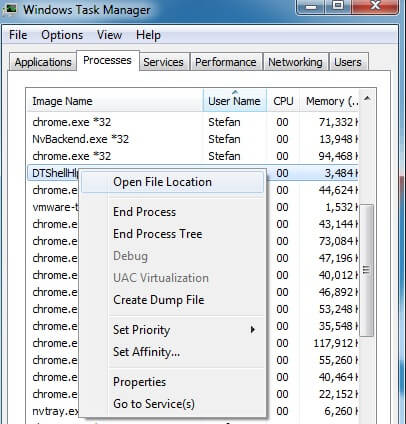
Press CTRL + SHIFT + ESC at the same time and go to the Processes Tab. Try to determine which processes are dangerous. 
malware-start-taskbar
Right click on each of them and select Open File Location. Then scan the files with our free online virus scanner:
SELECT FILES
Drag and Drop Files Here to Scan
Maximum file size: 128MB.
This scanner is free and will always remain free for our website's users. You can find its full-page version at: https://howtoremove.guide/online-virus-scanner/


Scan Results


Virus ScannerResult
ClamAV
AVG AV
Maldet

After you open their folder, end the processes that are infected, then delete their folders. 
Note: If you are sure something is part of the infection – delete it, even if the scanner doesn’t flag it. No anti-virus program can detect all infections.
Step3
Hold the Start Key and R –  copy + paste the following and click OK:
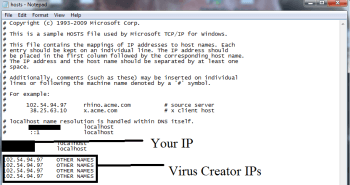
notepad %windir%/system32/Drivers/etc/hosts
A new file will open. If you are hacked, there will be a bunch of other IPs connected to you at the bottom. Look at the image below:
hosts_opt (1)
If there are suspicious IPs below “Localhost” – write to us in the comments.
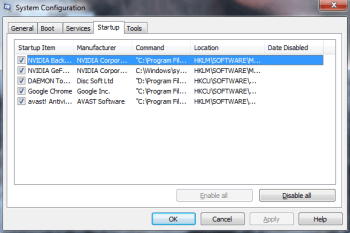
Type msconfig in the search field and hit enter. A window will pop-up:
msconfig_opt
Go in Startup —> Uncheck entries that have “Unknown” as Manufacturer.
  • Please note that ransomware may even include a fake Manufacturer name to its process. Make sure you check out every process here is legitimate.
Step4
Keep in mind, SpyHunter’s malware & virus scanner is free. To remove the infection, you'll need to purchase its full version. More information about SpyHunter and steps to uninstall.
Type Regedit in the windows search field and press Enter. Once inside, press CTRL and F together and typethe virus’s Name. 
Search for the ransomware  in your registries and delete the entries. Be extremely careful –  you can damage your system if you delete entries not related to the ransomware.
Type each of the following in the Windows Search Field:
  1. %AppData%
  2. %LocalAppData%
  3. %ProgramData%
  4. %WinDir%
  5. %Temp%
Delete everything in Temp. The rest just check out for anything recently added. Remember to leave us a comment if you run into any trouble!
Step5 

How to Decrypt .Lukitus Virus Ransomware files

We have a comprehensive (and daily updated) guide on how to decrypt your files. Check it out here.
If the guide doesn’t help, download the anti-virus program we recommended or try our free online virus scanner. Also, you can always ask us in the comments for help!
Which Ransomware category does .Lukitus Ransomware fall into?
.Lukitus Virus is an excellent example of nasty file-encrypting Ransomware (aka cryptovirus). As already mentioned, members of this group can secretly enter your computer without your consent and make all of your data inaccessible. What you may not know, however, is that, in most of the cases, such a virus can infect your computer with the help of a Trojan horse. One of the functions of the Trojans, apart from causing various malfunctions on the infected computers, is to unnoticeably pass Ransomware to your computer by taking advantage of one of its vulnerabilities. As soon as the two malicious pieces enter your system, they usually immediately proceed with the implementation of what they have been programmed to do.
Is there a successful solution that could fight a threat as dangerous as .Lukitus Virus Ransomware?
Every reputed security expert will confirm to you that Ransomware is usually extremely complicated to deal with. The affected users may often need professional assistance or the help of some powerful antivirus application to remove .Lukitus Virus and deal with its consequences. Very frustrating is the fact that the reversal of the encryption may not always be possible and nothing can guarantee the complete recovery from its effects on the affected files. Unfortunately, even completing the ransom payment request from the hackers, may not bring your locked files and the infected computer back to normal. For this reason, when dealing with Ransomware, we usually recommend that victims make every effort to cope with this terrible infection in alternative ways and not to rush with the ransom payments. A specialized Removal Guide like the one that we have published below could be of help if you want to remove .Lukitus. Moreover, once you eliminate the infection from your computer, you can safely connect some file backup sources such as external drives, cloud storage, SD cards or other data storage devices and extract some copies of the affected files from there. If you don’t have backups, it won’t hurt if you give the suggested file-restoration instructions a try, but bear in mind we cannot promise complete success.
A very helpful tip for the future:
Backing up your most valuable files is the best thing you can do to eliminate the risk of losing important data – be it a Ransomware attack, a disk crash or some other nasty virus attack. So, keep copies of all files that are most important to you somewhere on an external drive and no one will be able to harm it or blackmail you to access it.
SUMMARY:
Name.Lukitus
TypeRansomware
Danger LevelHigh (Ransomware is by far the worst threat you can encounter)
SymptomsVery few and unnoticeable ones before the ransom notification comes up.
Distribution MethodFrom fake ads and fake system requests to spam emails and contagious web pages.
Data Recovery ToolCurrently Unavailable
Detection ToolWe generally recommend SpyHunter or a similar anti-malware program that is updated daily.

Locky Ransomware switches to the Lukitus extension for Encrypted Files

Today a new Locky Ransomware variant was discovered by Rommel Joven that switches to the .lukitus extension for encrypted files. It is important to note that if you are infected with this ransomware, you are not infected with the Lukitus Ransomware, as some sites may call it. You are instead infected by Locky, which is using the .lukitus extension.  There is a difference.
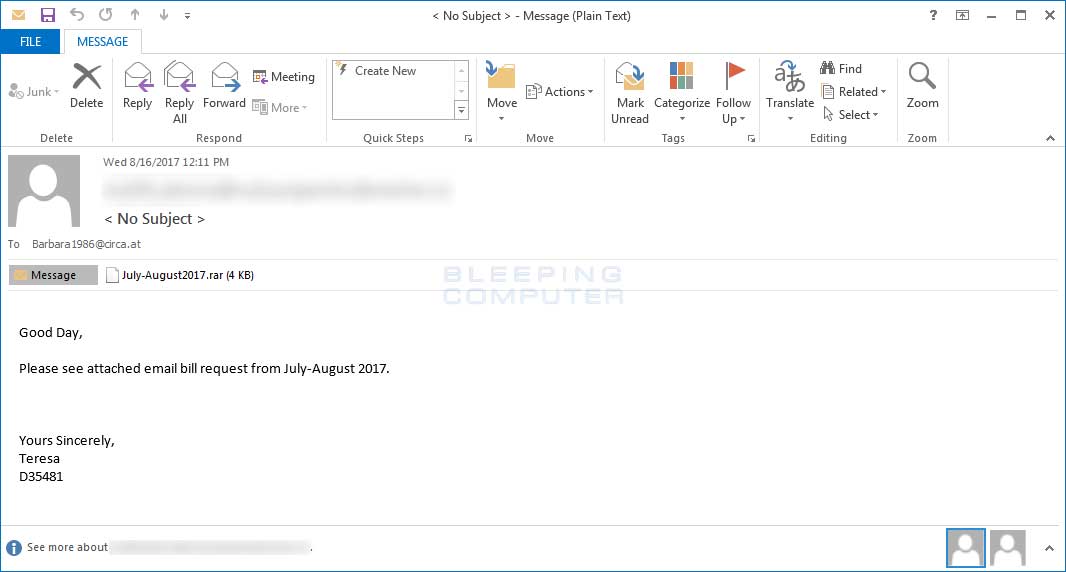
According to Derek Knight, this variant is currently being distributed via spam emails that have subject lines of < No Subject > or Emailing - CSI-034183_MB_S_7727518b6bab2, which contain zip or rar attachments with JS files. When these JS files are executed, they will download the Locky executable from a remote site.
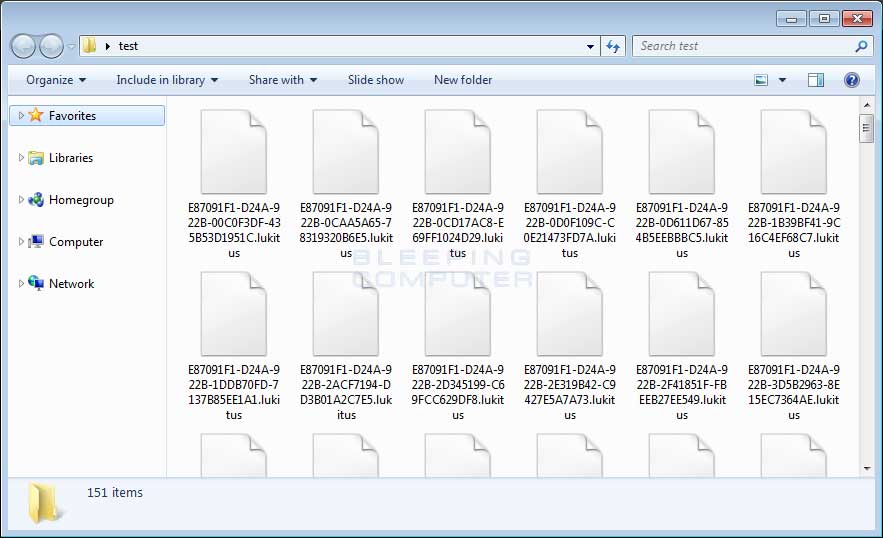
This means that a file named 1.png would be encrypted and named something like as E87091F1-D24A-922B-00F6B112-72BB7EA6EADF.lukitus.
Files encrypted with the Lukitus Locky Ransomware Variant
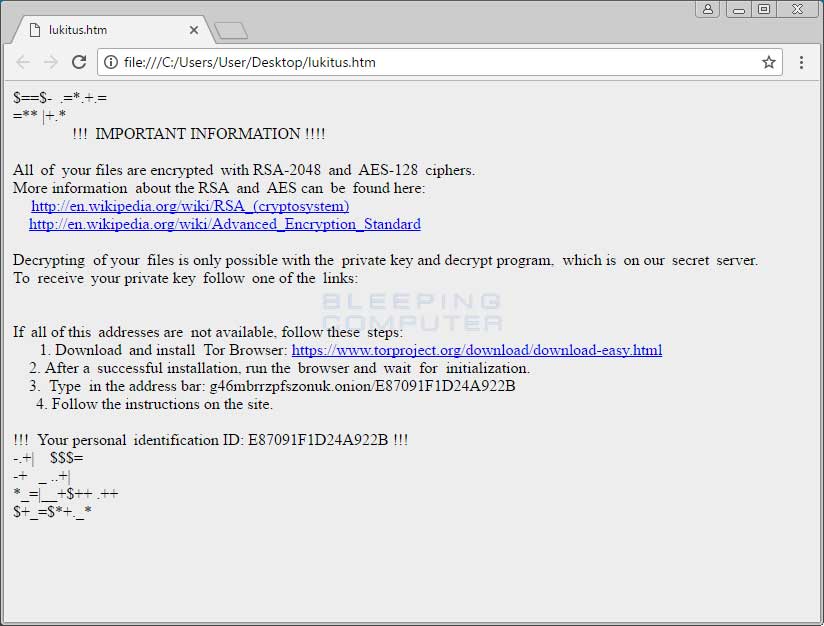
When Locky has finished encrypting the computer, it will remove the downloaded executable and then display a ransom note that provides information on how to pay the ransom. The names of these ransom notes have changed for this version to lukitus.htm and lukitus.bmp. 
Locky Ransom Note
Locky Lukitus Ransom Note
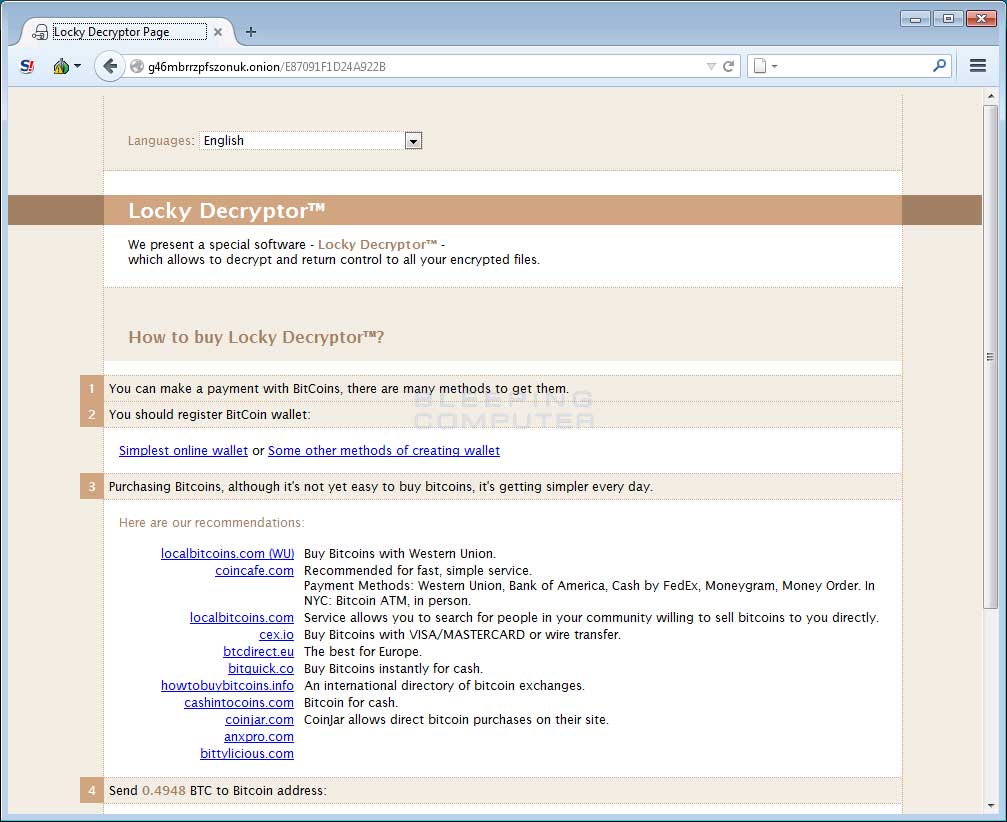
At the time of this writing, the Locky Decryptor TOR payment site has the ransom set to .49 BTC or approximately $2,000 USD.
Locky Decryptor Payment Site

It is not possible to decrypt the Locky Ransomware Lukitus Variant

Unfortunately, at this time it is still not possible to decrypt .lukitus files encrypted by the Locky Ransomware for free.
The only way to recover encrypted files is via a backup, or if you are incredibly lucky, through Shadow Volume Copies. Though Locky does attempt to remove Shadow Volume Copies, in rare cases ransomware infections fail to do so for whatever reason. Due to this, if you do not have a viable backup, I always suggest people try as a last resort to restore encrypted files from Shadow Volume Copies as well.
For those who wish to discuss the Locky ransomware or need support, you can use our dedicated Locky Ransomware Help & Support Topic.

How to protect yourself from the Locky Ransomware

In order to protect yourself from Locky, or from any ransomware, it is important that you use good computing habits and security software. First and foremost, you should always have a reliable and tested backup of your data that can be restored in the case of an emergency, such as a ransomware attack.
You should also have security software that contains behavioral detections such as Emsisoft Anti-Malware or Malwarebytes. I also recommend trying a dedicated ransomware protection program like RansomFree.
Last, but not least, make sure you practice the following good online security habits, which in many cases are the most important steps of all:
  • Backup, Backup, Backup!
  • Do not open attachments if you do not know who sent them.
  • Do not open attachments until you confirm that the person actually sent you them,
  • Scan attachments with tools like VirusTotal.
  • Make sure all Windows updates are installed as soon as they come out! Also make sure you update all programs, especially Java, Flash, and Adobe Reader. Older programs contain security vulnerabilities that are commonly exploited by malware distributors. Therefore it is important to keep them updated.
  • Make sure you use have some sort of security software installed.
  • Use hard passwords and never reuse the same password at multiple sites.
For a complete guide on ransomware protection, you visit our How to Protect and Harden a Computer against Ransomware article.
Update 8/16/17 7:21 PM - Updated with information about spam distribution.Spam Email

Manually delete .Lukitus File Virus from your computer


Notice! The above list with domains is for purely informational purposes and it is strongly advised against the opening of any of them, because they will download the virus onto your computer.
Here is the body text of most current e-mail spam campaigns:
Your message is ready to be sent with the following file or link
attachments:
Payment_201708-838
Note: To protect against computer viruses, e-mail programs may prevent
sending or receiving certain types of file attachments. Check your e-mail
security settings to determine how attachments are handled.
Before opening any file from the Internet, always perform a scan with a security program. You should read the ransomware preventing tips in our forum to inform yourself better about methods for fighting such malware threats.

.Lukitus File Virus – Technical Information

The .lukitus File Virus is actually the newest variant of Locky ransomware. Dubbed after the extension .lukitus that it places to encrypted files, this version of the infamous cryptovirus has been discovered to spread not only with the help of its old malicious domains, but with some new ones.
The Locky ransomware also makes entries in the Windows Registry to achieve a higher level of persistence. Registry entries of that caliber are typically designed to start the virus automatically with every launch of the Windows Operating System or even repress and tamper with processes.
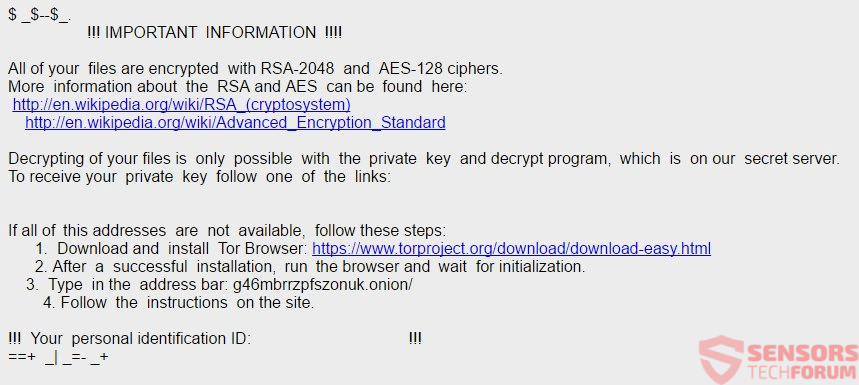
The message with the ransom payment instructions appears to be unchanged and is stored in two files yet again – one in a .jpg, the other in a .html. You can preview the picture that is placed as your Desktop background below:
The ransom message reads the following:
=*~*I+_=
-+H=I-~I_-=+*$
-=~$*I_=.*
!!! IMPORTANT INFORMATION !!!!
All of your files are encrypted with RSA-2048 and AES-128 ciphers.
Decrypting of your files is only possible with the private key and decrypt program, which is on our secret server.
To receive your private key follow one of the links:
If all of this addresses are not available, follow these steps:
1. Download and install Tor Browser: https://www.torproject.org/downIoad/download-easy.html
2. After a successful installation, run the browser and wait for initialization.
3. Type in the address bar: g46mbrrzpfszonuk.onion
4. Follow the instructions on the site.
!!! Your personal identification ID: !!!
-=_+~_=~=
~*$~l.$*._
You can preview the .html version of that note in the picture down here:
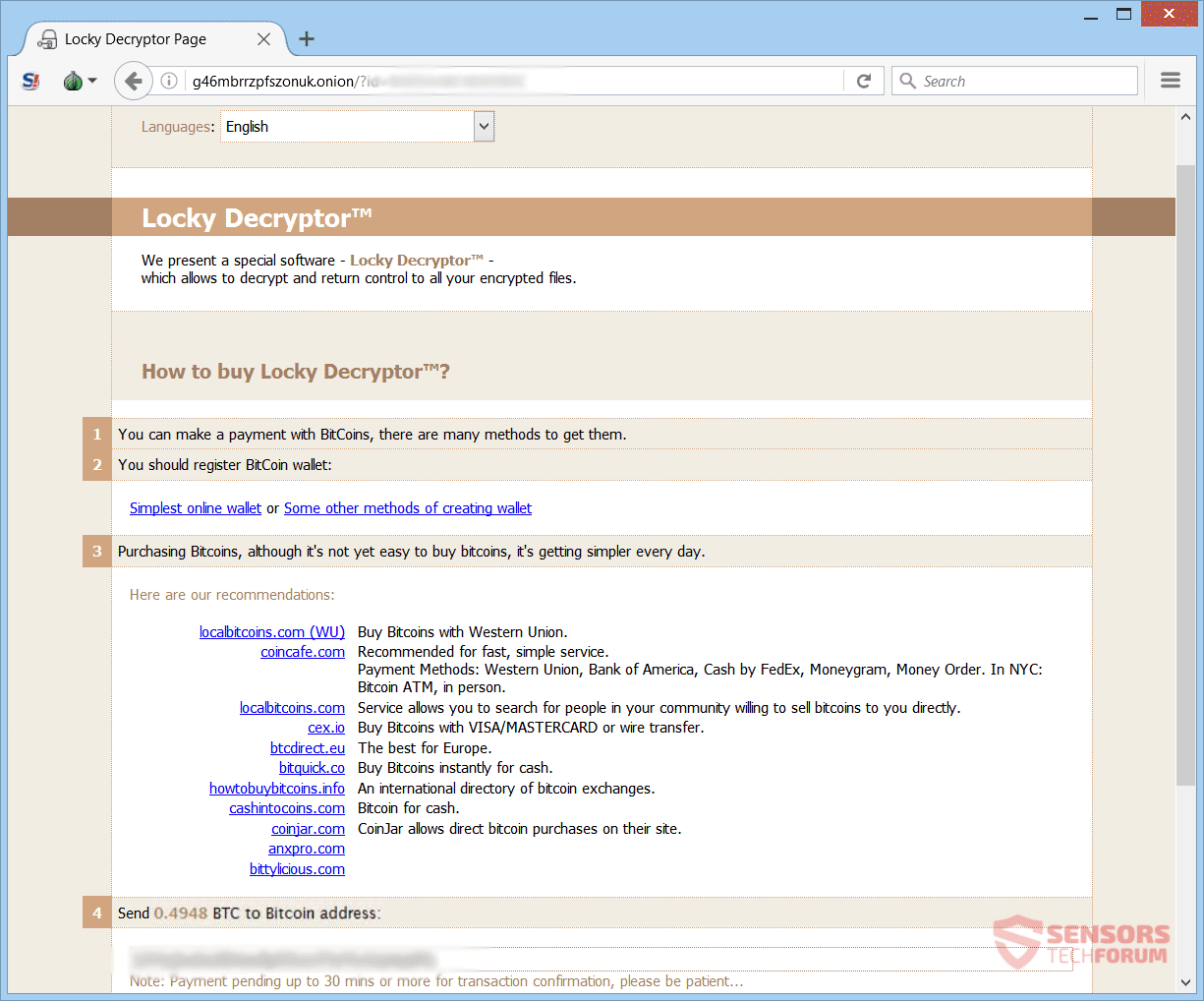
How the TOR payment page looks like:
Here is what it says on that payment page:
Locky Decryptor™
We present a special software – Locky Decryptor™ –
which allows to decrypt and return control to all your encrypted files.
How to buy Locky Decryptor™?
You can make a payment with BitCoins, there are many methods to get them.
You should register BitCoin wallet:
Simplest online wallet or Some other methods of creating wallet
Purchasing Bitcoins, although it’s not yet easy to buy bitcoins, it’s getting simpler every day.
Here are our recommendations:
localbitcoins.com (WU) Buy Bitcoins with Western Union.
coincafe.com Recommended for fast, simple service.
Payment Methods: Western Union, Bank of America, Cash by FedEx, Moneygram, Money Order. In NYC: Bitcoin ATM, in person.
localbitcoins.com Service allows you to search for people in your community willing to sell bitcoins to you directly.
cex.io Buy Bitcoins with VISA/MASTERCARD or wire transfer.
btcdirect.eu The best for Europe.
bitquick.co Buy Bitcoins instantly for cash.
howtobuybitcoins.info An international directory of bitcoin exchanges.
cashintocoins.com Bitcoin for cash.
coinjar.com CoinJar allows direct bitcoin purchases on their site.
anxpro.com
bittylicious.com
Send 0.5 BTC to Bitcoin address:
Note: Payment pending up to 30 mins or more for transaction confirmation, please be patient…
Date Amount BTC Transaction ID Confirmations
not found
Refresh the page and download decryptor.
When Bitcoin transactions will receive one confirmation, you will be redirected to the page for downloading the decryptor.
As clearly seen from the Tor payment page, the .Lukitus file virus wants you to pay 0.5 Bitcoin, which equals to nearly 2060 US dollars at the moment of writing this article. However, you should NOT under any circumstances pay anything to the cybercriminals. Nobody can guarantee that you can recover your data upon payment, or that you won’t get your computer infected once more in the future. Moreover, giving money to cybercriminals this way could be interpreted as supporting them financially, and could also motivate them to keep committing similar crimes, such as creating ransomware viruses. That is evidently true as new variants of Locky ransomware keep coming out.

.Lukitus File Virus – Encryption Process

The .lukitus File Virus is dubbed like that by victims, because it appends the .lukitus extension to all encrypted files. As malware researchers have confirmed that it is indeed a new variant of the Locky Ransomware, it is most likely seeking to encrypt files with extensions such as its previous iterations, and namely the following:
→.001, .002, .003, .004, .005, .006, .007, .008, .009, .010, .011, .123, .1cd, .3dm, .3ds, .3fr, .3g2, .3gp, .3pr, .602, .7z, .7zip, .ARC, .CSV, .DOC, .DOT, .MYD, .MYI, .NEF, .PAQ, .PPT, .RTF, .SQLITE3, .SQLITEDB, .XLS, .aac, .ab4, .accdb, .accde, .accdr, .accdt, .ach, .acr, .act, .adb, .adp, .ads, .aes, .agdl, .ai, .aiff, .ait, .al, .aoi, .apj, .apk, .arw, .asc, .asf, .asm, .asp, .aspx, .asset, .asx, .avi, .awg, .back, .backup, .backupdb, .bak, .bank, .bat, .bay, .bdb, .bgt, .bik, .bin, .bkp, .blend, .bmp, .bpw, .brd, .bsa, .cdf, .cdr, .cdr3, .cdr4, .cdr5, .cdr6, .cdrw, .cdx, .ce1, .ce2, .cer, .cfg, .cgm, .cib, .class, .cls, .cmd, .cmt, .config, .contact, .cpi, .cpp, .cr2, .craw, .crt, .crw, .cs, .csh, .csl, .csr, .css, .csv, .d3dbsp, .dac, .das, .dat, .db, .db3, .db_journal, .dbf, .dbx, .dc2, .dch, .dcr, .dcs, .ddd, .ddoc, .ddrw, .dds, .der, .des, .design, .dgc, .dif, .dip, .dit, .djv, .djvu, .dng, .doc, .docb, .docm, .docx, .dot, .dotm, .dotx, .drf, .drw, .dtd, .dwg, .dxb, .dxf, .dxg, .edb, .eml, .eps, .erbsql, .erf, .exf, .fdb, .ffd, .fff, .fh, .fhd, .fla, .flac, .flf, .flv, .flvv, .forge, .fpx, .frm, .fxg, .gif, .gpg, .gray, .grey, .groups, .gry, .gz, .hbk, .hdd, .hpp, .html, .hwp, .ibank, .ibd, .ibz, .idx, .iif, .iiq, .incpas, .indd, .iwi, .jar, .java, .jnt, .jpe, .jpeg, .jpg, .js, .kc2, .kdbx, .kdc, .key, .kpdx, .kwm, .laccdb, .lay, .lay6, .lbf, .ldf, .lit, .litemod, .litesql, .log, .ltx, .lua, .m2ts, .m3u, .m4a, .m4p, .m4u, .m4v, .mapimail, .max, .mbx, .md, .mdb, .mdc, .mdf, .mef, .mfw, .mid, .mkv, .mlb, .mml, .mmw, .mny, .moneywell, .mos, .mov, .mp3, .mp4, .mpeg, .mpg, .mrw, .ms11, .msg, .myd, .n64, .nd, .ndd, .ndf, .nef, .nk2, .nop, .nrw, .ns2, .ns3, .ns4, .nsd, .nsf, .nsg, .nsh, .nvram, .nwb, .nx2, .nxl, .nyf, .oab, .obj, .odb, .odc, .odf, .odg, .odm, .odp, .ods, .odt, .ogg, .oil, .onetoc2, .orf, .ost, .otg, .oth, .otp, .ots, .ott, .p12, .p7b, .p7c, .pab, .pages, .pas, .pat, .pcd, .pct, .pdb, .pdd, .pdf, .pef, .pem, .pfx, .php, .pif, .pl, .plc, .plus_muhd, .png, .pot, .potm, .potx, .ppam, .pps, .ppsm, .ppsx, .ppt, .pptm, .pptx, .prf, .ps, .psafe3, .psd, .pspimage, .pst, .ptx, .pwm, .py, .qba, .qbb, .qbm, .qbr, .qbw, .qbx, .qby, .qcow, .qcow2, .qed, .r3d, .raf, .rar, .rat, .raw, .rb, .rdb, .re4, .rm, .rtf, .rvt, .rw2, .rwl, .rwz, .s3db, .safe, .sas7bdat, .sav, .save, .say, .sch, .sd0, .sda, .sdf, .sh, .sldm, .sldx, .slk, .sql, .sqlite, .sqlite3, .sqlitedb, .sr2, .srf, .srt, .srw, .st4, .st5, .st6, .st7, .st8, .stc, .std, .sti, .stm, .stw, .stx, .svg, .swf, .sxc, .sxd, .sxg, .sxi, .sxm, .sxw, .tar, .tar.bz2, .tbk, .tex, .tga, .tgz, .thm, .tif, .tiff, .tlg, .txt, .uop, .uot, .upk, .vb, .vbox, .vbs, .vdi, .vhd, .vhdx, .vmdk, .vmsd, .vmx, .vmxf, .vob, .wab, .wad, .wallet, .wav, .wb2, .wk1, .wks, .wma, .wmv, .wpd, .wps, .x11, .x3f, .xis, .xla, .xlam, .xlc, .xlk, .xlm, .xlr, .xls, .xlsb, .xlsm, .xlsx, .xlt, .xltm, .xltx, .xlw, .xml, .ycbcra, .yuv, .zip
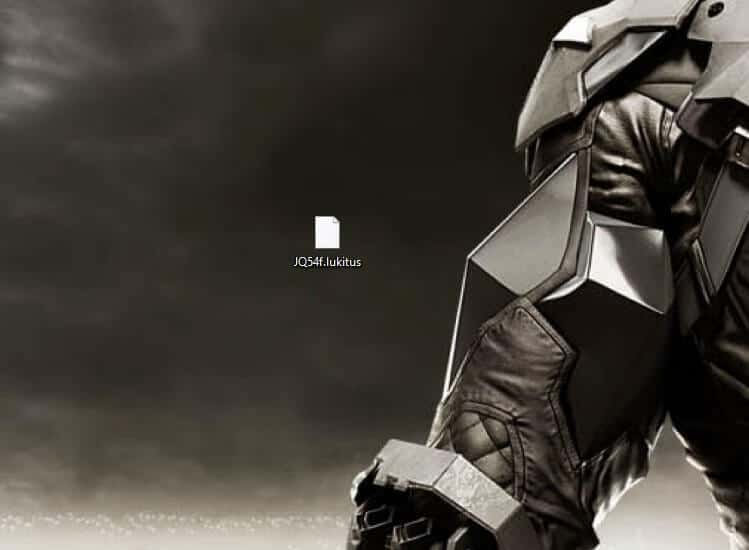
The encryption algorithm that is claimed to be used by Locky in all of its ransom notes is RSA-2048 with AES 128-bit ciphers. Encrypted files will be renamed with a logical sequence of numbers stemming from your ID number. For instance, such a file will look like G93562L1-K86Z-019J-47N5V911-87QP4TK6FHXM.lukitus.
The Locky cryptovirus has a highly probability to delete the Shadow Volume Copies from the Windows Operating System by executing the following command:
→vssadmin.exe delete shadows /all /Quiet
The command eliminates one of the prominent ways for file restoration on your computer system. That makes the encryption process of the virus even more viable.

Remove .Lukitus File Virus and Restore Your Files

If your computer got infected with the .Lukitus File Virus, you should have a bit of experience in removing malware. You should get rid of this ransomware as quickly as possible before it can have the chance to spread further and infect other computer systems. You should remove the ransomware and follow the step-by-step instructions guide provided below.

Manually delete .Lukitus File Virus from your computer

Note! Substantial notification about the .Lukitus File Virus threat: Manual removal of .Lukitus File Virus requires interference with system files and registries. Thus, it can cause damage to your PC. Even if your computer skills are not at a professional level, don’t worry. You can do the removal yourself just in 5 minutes, using a malware removal tool.
 

Games

Infolinks.com, 75834 , DIRECT appnexus.com, 3251, RESELLER openx.com, 118151, RESELLER, 6a698e2ec38604c6 openx.com, 540118184, DIRECT, 6a698e2ec38604c6 Pubmatic.com, 60809,RESELLER,5d62403b186f2ace Adtech.com, 11409, RESELLER google.com, pub-6373315980741255, RESELLER, f08c47fec0942fa0 google.com, pub-2697483239283649, RESELLER, f08c47fec0942fa0 aol.com, 6202, RESELLER aol.com, 17744, RESELLER lkqd.net, 295, RESELLER, 59c49fa9598a0117 lkqd.com, 295, RESELLER, 59c49fa9598a0117 Freewheel.tv, 482337, RESELLER Freewheel.tv, 480609, RESELLER revcontent.com, 29124, RESELLER appnexus.com, 7666, RESELLER, f5ab79cb980f11d1 rubiconproject.com, 156042, RESELLER, 0bfd66d529a55807 advertising.com, 8603, RESELLER advertising.com, 3531, RESELLER appnexus.com, 3364, RESELLER Indexexchange.com, 183756, RESELLER openx.com, 539154393, RESELLER rubiconproject.com, 16698, RESELLER, 0bfd66d529a55807 rubiconproject.com, 16904, RESELLER, 0bfd66d529a55807 deepintent.com, 100004190, RESELLER, 4a5487c769369a8c pubmatic.com, 156872, RESELLER, 5d62403b186f2ace taboola.com, 1139936,RESELLER,c228e6794e811952 taboola.com, 1135488,RESELLER,c228e6794e811952 vi.ai, 913453223927387, RESELLER spotxchange.com, 74964, RESELLER, 7842df1d2fe2db34 spotx.tv, 74964, RESELLER, 7842df1d2fe2db34 smartadserver.com, 2776,RESELLER pubmatic.com, 156830, RESELLER rubiconproject.com, 15476, RESELLER, 0bfd66d529a55807 contextweb.com, 559988, RESELLER, 89ff185a4c4e857c